
Open any "speed up WordPress" guide and the advice arrives within the first screen: install Redis. Good advice on a VPS you control. Dead advice on a shared plan, where you have no root, no daemon, and no port to connect to. Your host gives you PHP and MySQL, and that is the whole toolbox.
The problem Redis solves does not go away just because your hosting cannot run it.
The cache WordPress ships with dies every request
WordPress already has an object cache. The WP_Object_Cache class sits between the codebase and the database, holding the results of expensive lookups: options, transients, post meta, query results.
By default it is non-persistent. WordPress's own documentation is blunt about it: data in the cache lives in memory only for the duration of the request. When the request ends, the cache is gone. The next page view rebuilds all of it from MySQL again.
On shared hosting this hurts twice. You run more requests than a quiet VPS site would notice, and the MySQL server you are hitting is the most oversold thing in the building. Every repeat lookup is a repeat trip to the slowest resource you share.
There is a second cost most people miss. Without a persistent cache, the Transients API writes to the wp_options table instead. So transient reads and writes are extra traffic on that same crowded database.
A persistent object cache fixes this by keeping those objects alive between requests. WordPress supports it through a drop-in: put an object-cache.php in wp-content and core hands the cache to whatever backend that file implements. Redis and Memcached are the usual backends. Both need a separate server process. Which brings us back to the problem.
Page cache and object cache are not the same fix
One short detour, because these two get conflated constantly.
A page cache stores finished HTML and serves it to anonymous visitors without running WordPress at all. An object cache stores data objects for WordPress itself, while WordPress is running.
The pages where an object cache pays are exactly the pages a page cache cannot touch: wp-admin screens, logged-in users, WooCommerce cart and checkout, anything personalized. If your homepage is already fast for guests but the admin drags and the cart crawls, you are looking at an object-cache-shaped hole. I covered the "page cache is on and the site is still slow" version of this in why caching plugins don't fix slow WordPress.
Who cannot "just install Redis"
The tutorials assume you own the box. This DevAnswers guide starts at sudo apt install redis-server. HostMyCode's 2026 tutorial is scoped to a VPS in the title. FlyWP's walkthrough has you installing the service through your package manager. All fine guides, all useless the moment sudo does not exist.
Managed hosting does not rescue you either. Kinsta sells Redis as an add-on at $100 per month per site. On a $10 shared plan, "install Redis" quietly means "change your hosting or your budget."
That is a lot of sites. Most WordPress installs run on a single cheap web server with no cache server attached, which the author of the plugin below states plainly: the vast majority of sites are single-server.
SQLite Object Cache: the option those guides skip
SQLite Object Cache by Ollie Jones is a persistent object cache that needs no server at all. Its tagline on the directory listing says it directly: a fast persistent object cache backend "for the rest of us."
It uses the SQLite3 extension to PHP, which many hosting builds already include, and it can use igbinary and APCu for extra speed when they are available. The cache lives in one SQLite file under wp-content, running in WAL mode. No daemon, no socket, no wp-config host settings.
The counterintuitive part is that swapping MySQL for SQLite makes things faster. It works because the bottleneck was never SQL. It was the round trip to an overloaded shared MySQL server. A SQLite read is a local function call measured in microseconds, and the file mostly sits in the operating system's page cache anyway.
The numbers back the mechanism. On his published benchmark (WooCommerce test site with 1,350 products, older stack: WP 6.0.1 on Ubuntu 22.10), Jones measured catalog-page throughput of 13.2 pageviews per second with no persistent cache, 18.0 with SQLite Object Cache (+36%), 15.0 with Redis on localhost, and 11.3 with Redis on a dedicated machine. Read that last number again: remote Redis came in slower than no object cache at all. On a single box, every Redis operation is a network round trip that SQLite does not make.
An independent test points the same direction. In Clypper Technology's May 2026 object-cache benchmark (WP 7.0, WooCommerce 10.7, k6 load test at 50 concurrent users), SQLite Object Cache improved throughput 15.4% over baseline while Redis managed 4.5%. Redis was the weakest persistent option they tested on one machine.
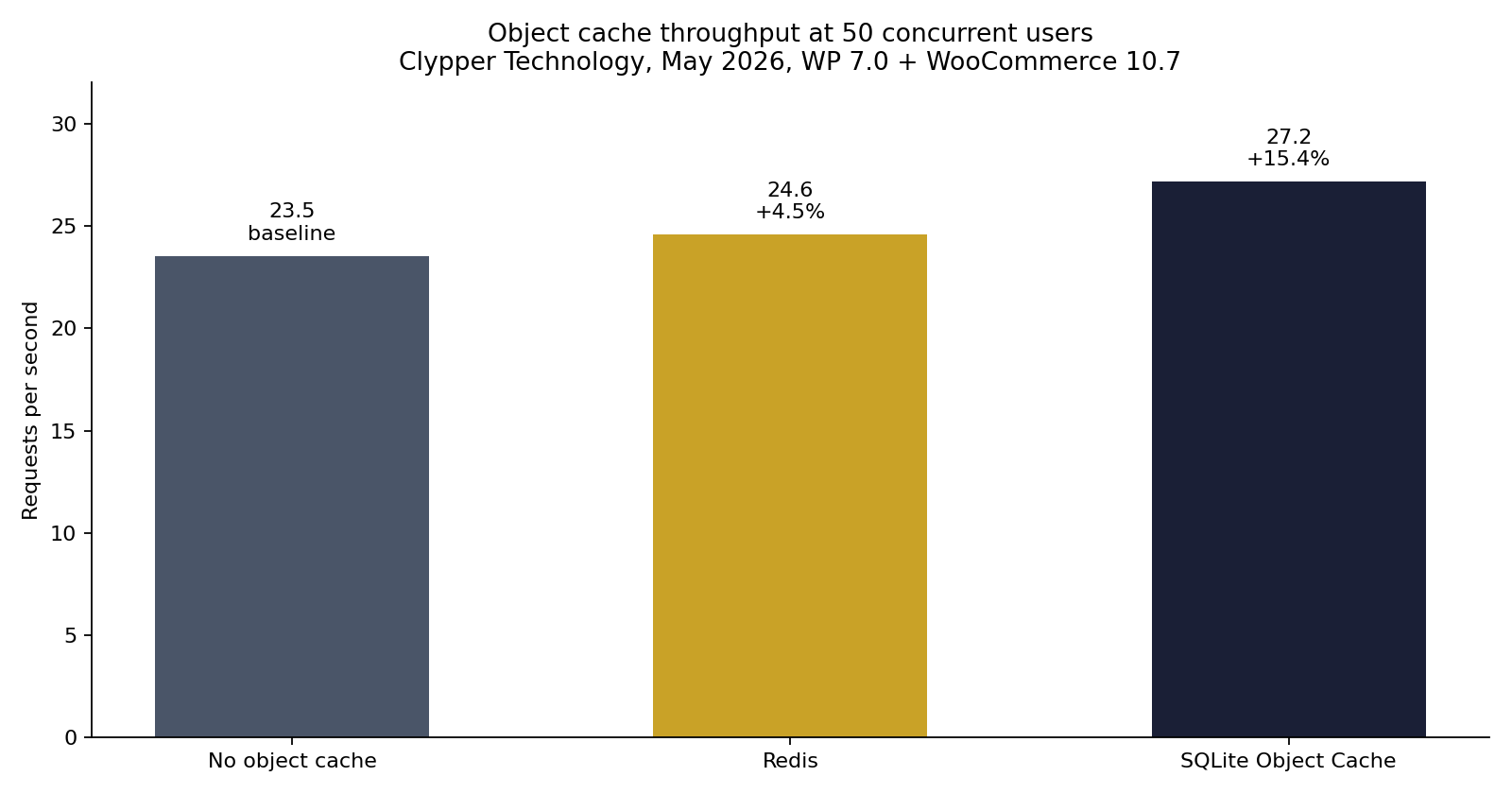
Two honest caveats on those numbers: both benchmarks measure uncached dynamic pages on test rigs, not your site, and Jones's run is a few WordPress versions old. Treat them as direction, not a promise.
Install it and verify it works
Install through Plugins > Add New, or from the shell with the commands the readme itself gives:
wp plugin install sqlite-object-cache
wp config set WP_CACHE_KEY_SALT $(openssl rand -base64 12)
wp plugin activate sqlite-object-cache
wp sqlite-object-cache size 32
Now prove it, because "I activated a plugin" is not a measurement.
Check the drop-in engaged. With WP-CLI, wp cache type answers Default when no external cache is in play. After activation it should stop saying Default. Without shell access, the plugin's own panel under Settings > Object Cache shows status and live operation statistics.
Count the queries. Install Query Monitor, open a wp-admin screen, reload it, and watch the query count drop on the second load. Objects that were served from the cache are queries MySQL never saw. This is the same check I use after any cache change: admin or logged-in views, never the page-cached homepage.
Time an uncached response. Measure a page your page cache refuses to serve. The WooCommerce cart works; wp-admin works when logged in. The cart is the WooCommerce page I measure first for exactly this reason, and it is on my performance tips list for the same reason:
curl -o /dev/null -s -w 'TTFB %{time_starttransfer}s\n' https://your-site.example/cart/Run it before and after. You are looking for a real TTFB delta on the uncached page, not a faster-looking cached one.
I ran those curls on a throwaway local WordPress install with WooCommerce 11.1 and SQLite Object Cache 1.6.5. Docker on my machine, not a shared host, so the times are small. Direction still showed up.
Before: wp cache type printed Default. Warm median TTFB, five requests after discarding the first: wp-admin 47 ms, /cart/ 85 ms.
After the drop-in was in place, wp cache type no longer said Default (WP-CLI printed Unknown). Same URLs: wp-admin 36 ms, /cart/ 70 ms.
That is an idle local box. I do not have a shared-host measurement, and 36 ms is not what a $10 plan will do.
One WP-CLI note if your host has APCu: the plugin writes every object to both APCu and SQLite because WP-CLI cannot see the APCu cache. Normal behavior, not a bug.
The honest limits
One web server only. The plugin author says it himself: SQLite does not work correctly in a multiple-web-server environment. If your site runs behind a load balancer, each node's cache file drifts out of sync. Multi-node means Redis or Memcached, full stop.
It is not a page cache. Anonymous-visitor TTFB still wants page caching or a CDN in front. Different layer, different fix.
It will not shrink a bloated alloptions blob. A persistent cache moves autoloaded options out of MySQL, but PHP still loads and unserializes the whole set on every request. A fat autoload stays fat behind any object cache. If your wp_options autoload is the problem, fix that first: the autoload bloat guide walks the cleanup.
Heavy concurrent writes are its weak spot. SQLite serializes writes. Object caches are read-heavy so this rarely bites, but a write-storming site is exactly the case where a real cache server earns its keep.
When to stop and get Redis anyway
Get Redis when you add a second web server, when your host already includes Redis or Memcached, or when you are on a VPS where installing it costs you five minutes. On one box, the benchmarks above say SQLite is competitive or better. Across boxes, Redis is the only correct answer.
There is also a middle path worth knowing: Docket Cache stores objects as PHP files that ride OPcache, another no-server approach, and it benchmarked well in the same Clypper test. I have not run it on production sites, so I point at it rather than recommend it.
The short version
If your host gives you no cache server, your site still deserves a persistent object cache. SQLite Object Cache fills that gap on any single-server site with the SQLite3 PHP extension, and both its author's numbers and an independent benchmark say it beats Redis-on-localhost for exactly that setup.
This is also the logic WP Multitool's Site Doctor shipped in v1.6.3: it looks at what your box can actually run and names the backend, Redis where a cache server exists, SQLite Object Cache where it does not, instead of handing every site the same "add Redis" line.
Your homepage cache makes the site look fast. The object cache is what makes wp-admin, the cart, and every logged-in page feel fast. Shared hosting only blocks the Redis flavor of that fix, not the fix itself.