
Every audit of WordPress autoload bloat starts with the same SQL. I have pasted it myself for years:
SELECT SUM(LENGTH(option_value)) AS autoload_bytes
FROM wp_options
WHERE autoload = 'yes';
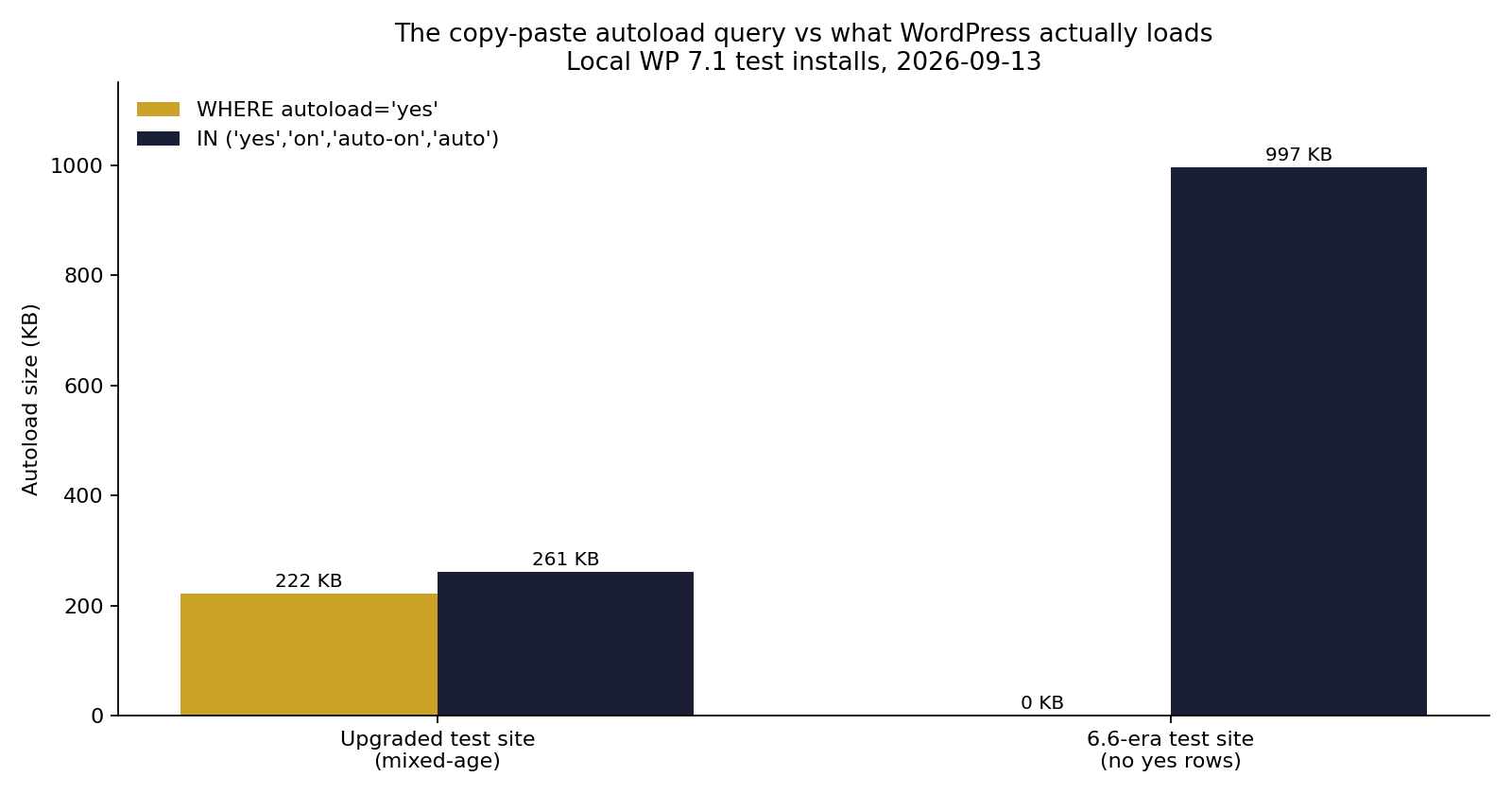
Since WordPress 6.6 that query undercounts. On one of my test sites it returns zero rows while the site actually loads 997 KB of options on every request.
The autoload column stopped being a yes/no flag in July 2024. Most of the internet's copy-paste SQL never caught up.
The query that won't die
The autoload = 'yes' filter is everywhere because it used to be correct. Before 6.6, core only ever wrote yes or no into that column, so matching yes matched reality.
It is still the query you get from hosting knowledge bases. Pressable's guide to optimizing autoloaded data uses it. So does WPMU DEV's docs page on fixing autoload issues and Servebolt's cleanup guide. These are decent articles. They just measure a definition of autoload that core abandoned two years ago, and the gap grows every release.
Forum answers and phpMyAdmin gists are worse, but those at least have the excuse of being old.
What WordPress 6.6 actually stores
Since 6.6, add_option() and update_option() take true, false, or null for the autoload flag, and the database stores one of five strings:
| Stored value | Set by | Autoloads? |
|---|---|---|
on | Explicit true | Yes |
off | Explicit false | No |
auto-on | A heuristic decided yes | Yes |
auto | No explicit value, no decision | Yes |
auto-off | A heuristic decided no | No |
The old yes and no values still work. There was no migration routine, so a site upgraded from before 6.6 keeps its yes rows and they get treated like on. Anything written or updated since gets the new values. That is why the stale query drifts further from the truth the longer a site runs on modern WordPress.
Which values autoload is decided by one function, wp_autoload_values_to_autoload(). This is the entire list, straight from core:
$autoload_values = array( 'yes', 'on', 'auto-on', 'auto' );wp_load_alloptions() builds its WHERE clause from that array. Four values load on every request. The old SQL checks one of them.
A detail worth knowing: auto autoloads today, but the 6.6 dev note says the default may change in a future release. As of 7.1 it still loads.
There is also a size heuristic most people missed. Add an option without an explicit autoload flag and, if the serialized value is over 150,000 bytes, core stores it as auto-off. Big options now evict themselves from autoload. The threshold is filterable via wp_max_autoloaded_option_size.
Two consequences if you write plugins. Passing 'yes' or 'no' to add_option() still works, but both are marked deprecated in the function docs, so use true, false, or null. And when update_option() saves a value without an explicit flag, core re-runs the heuristic. An option that drifts past 150 KB can flip itself to auto-off on its next save, with no plugin code involved.
The corrected query
Match core's list and the number becomes honest again:
SELECT COUNT(*) AS rows_n,
       ROUND(SUM(LENGTH(option_value)) / 1024, 1) AS autoload_kb
FROM wp_options
WHERE autoload IN ('yes', 'on', 'auto-on', 'auto');
Adjust the wp_ prefix if yours differs. With WP-CLI:
wp db query "SELECT COUNT(*) AS rows_n, ROUND(SUM(LENGTH(option_value))/1024,1) AS autoload_kb FROM wp_options WHERE autoload IN ('yes','on','auto-on','auto')"And to see what is actually heavy:
SELECT option_name, autoload,
       ROUND(LENGTH(option_value) / 1024, 1) AS kb
FROM wp_options
WHERE autoload IN ('yes', 'on', 'auto-on', 'auto')
ORDER BY LENGTH(option_value) DESC
LIMIT 25;
Prove the delta on your own site
Run both queries and subtract. First, a distribution check so you can see what the column holds:
SELECT autoload, COUNT(*) AS rows_n,
       ROUND(SUM(LENGTH(option_value)) / 1024, 1) AS kb
FROM wp_options
GROUP BY autoload
ORDER BY kb DESC;
I ran this on two of my local test installs. Not client sites, just the WordPress 7.1 boxes I use for plugin work, which makes them a fair sample of what 6.6+ writes.
First install, one that has been upgraded across versions:
stale query : 123 rows, 222.0 KB
real        : 142 rows, 261.4 KB
The old query misses 19 rows and 39 KB. An 18% undercount. Annoying, not dramatic.
Second install, built entirely in the 6.6 era:
stale query : 0 rows, 0.0 KB
real        : 355 rows, 996.9 KB
Zero. That site has no yes rows at all because everything on it was written under the new schema. It loads almost a megabyte of autoloaded options per request, and the classic query reports nothing.
The biggest rows there are the usual suspects: wpseo_taxonomy_meta at 292 KB, wpseo_titles at 152 KB, woocommerce_marketplace_suggestions at 139 KB, plus Elementor, Stripe and Mailchimp cache rows. Every one of them sits on on, invisible to the stale query.
Here is the useful tell in the other direction. Site Health computes its autoloaded size from wp_load_alloptions(), the same function that runs the real query, so Site Health is already correct. If Site Health reports "Autoloaded options could affect performance" while your phpMyAdmin math says you are well under 800 KB, your query is the thing that is wrong. The threshold it compares against is 800,000 bytes, filterable through site_status_autoloaded_options_size_limit.
What not to delete
The instinct after seeing a big number is to start deleting rows. Two traps.
auto-off rows are already out. If you find a 200 KB option marked auto-off, core's size heuristic already excluded it from autoload. It costs you storage, not load time. Deleting it speeds nothing up and removes data a plugin may still read.
Core options are load-bearing. rewrite_rules lands in top-25 lists on almost every site and looks like a cache you could flush. It does regenerate, but it also must autoload, and removing it the wrong way gives you a site full of 404s. Same class of problem for wp_user_roles, active_plugins, siteurl, template, stylesheet. Sorting by size tells you what is heavy. It says nothing about what is safe.
For rows that are heavy and genuinely not needed on every request, flip the flag instead of deleting:
wp option set-autoload some_plugin_cache offThe option stays in the table and the plugin still finds it through get_option(). It just stops loading on every page. Deleting is for orphans: rows left behind by plugins you removed for good.
Redis does not shrink this
A persistent object cache moves the alloptions blob from MySQL to Redis. The blob still lands in PHP memory on every request and still gets unserialized, so a fat autoload set stays fat behind Redis. I wrote about the "connected but not helping" side of that on the WP Multitool blog.
The short version
If your autoload audit only matches yes, run it again with the full IN list. The complete cleanup flow, finding orphans and deciding what to flip, is on the WP Multitool autoload bloat guide, which already uses the corrected query. Autoload is also one line item in my larger performance checklist.
The column changed in July 2024. Most of the SQL on the internet did not.