WooCommerce is slow. Not "tweak a few settings" slow - fundamentally slow. The architecture was designed for a world where PHP died after every request and MySQL was your only cache. On a modest server you get 50-200ms TTFB on browse pages, with p95 latencies that double under any real load.
I wanted to see how fast it can actually get. So I built UltrafastWoo - a WooCommerce stack stacking FrankenPHP worker mode, Caddy Souin full-page cache, and Datastar. This post covers what I built, the actual numbers from 79 k6 benchmark runs, and the gotchas that cost me hours.
The Problem
Three things compound to make WooCommerce slow.
Cold start. PHP-FPM spawns a process per request. Each request re-executes the WP autoloader, fetches wp_options from the database, registers hundreds of hooks, initializes WooCommerce from scratch. The wp_options fetch alone can be 2-10 MB of serialized data on a typical WC install. Wasted work, every single request.
JS bloat. A standard WC storefront ships jQuery, jQuery UI, wc-cart-fragments (an AJAX call on every page load), wc-add-to-cart, Select2 - 250-400 KB of JavaScript before the page is interactive. On mobile, on a slow connection, this is brutal.
Cache bypasses. WooCommerce sets cookies for sessions, cart state, nonces. Most full-page caches punt on any request with a cookie. Even a basic in-memory cache misses for a large fraction of real traffic.
My fix was to stack three existing solutions and fill the gaps between them:
- FrankenPHP in worker mode - PHP stays alive between requests, amortizing the bootstrap cost over thousands of requests
- Caddy with Souin FPC - full-page cache that correctly respects
Cache-Control: no-storefrom the application layer - Datastar - replaces the entire jQuery/AJAX frontend with about 10 KB of server-sent events
None of these were new. The gap was that nobody had integrated all three with WooCommerce specifically.
Research
Before writing any code I looked at what already existed.
FrankenWP (wpeverywhere/frankenwp, 50K+ Docker Hub pulls) bundles FrankenPHP, Caddy, and a server-caching middleware into one image. Production-grade, actively maintained. Forking it was an easy call.
HyperPress (92 GitHub stars) integrates Datastar, HTMX, and Alpine AJAX into WordPress. It exposes a /wp-html/v1/ endpoint for hypermedia partials. The gap: zero WooCommerce integration. No cart templates, no checkout SSE, no shop archive. That gap is what UltrafastWoo fills.
Existing debloat plugins (Disable Bloat, Perfmatters, Debloat for WooCommerce) all cover the "remove things" angle. I borrowed their patterns into an MU-plugin with WC-specific defaults rather than reinventing them.
One constraint I hit early: wpeverywhere/frankenwp only ships latest-php8.2 and latest-php8.3 as of April 2026. FrankenPHP embeds PHP at build time, you can't overlay PHP 8.5 on top. I proceeded with PHP 8.3 in the FrankenWP layer while building PHP 8.5 directly from dunglas/frankenphp:1.12.2-php8.5 for the benchmark comparison.
Worker mode latency matters: FrankenPHP worker mode delivers ~60% lower latency and 2-3x throughput vs PHP-FPM. One catch: idle memory is 3-4x higher than PHP-FPM (workers stay loaded). The tradeoff is worth it on a store with real traffic. You're not paying cold-start overhead on every request.
The Stack
The architecture has five layers with clear responsibilities:
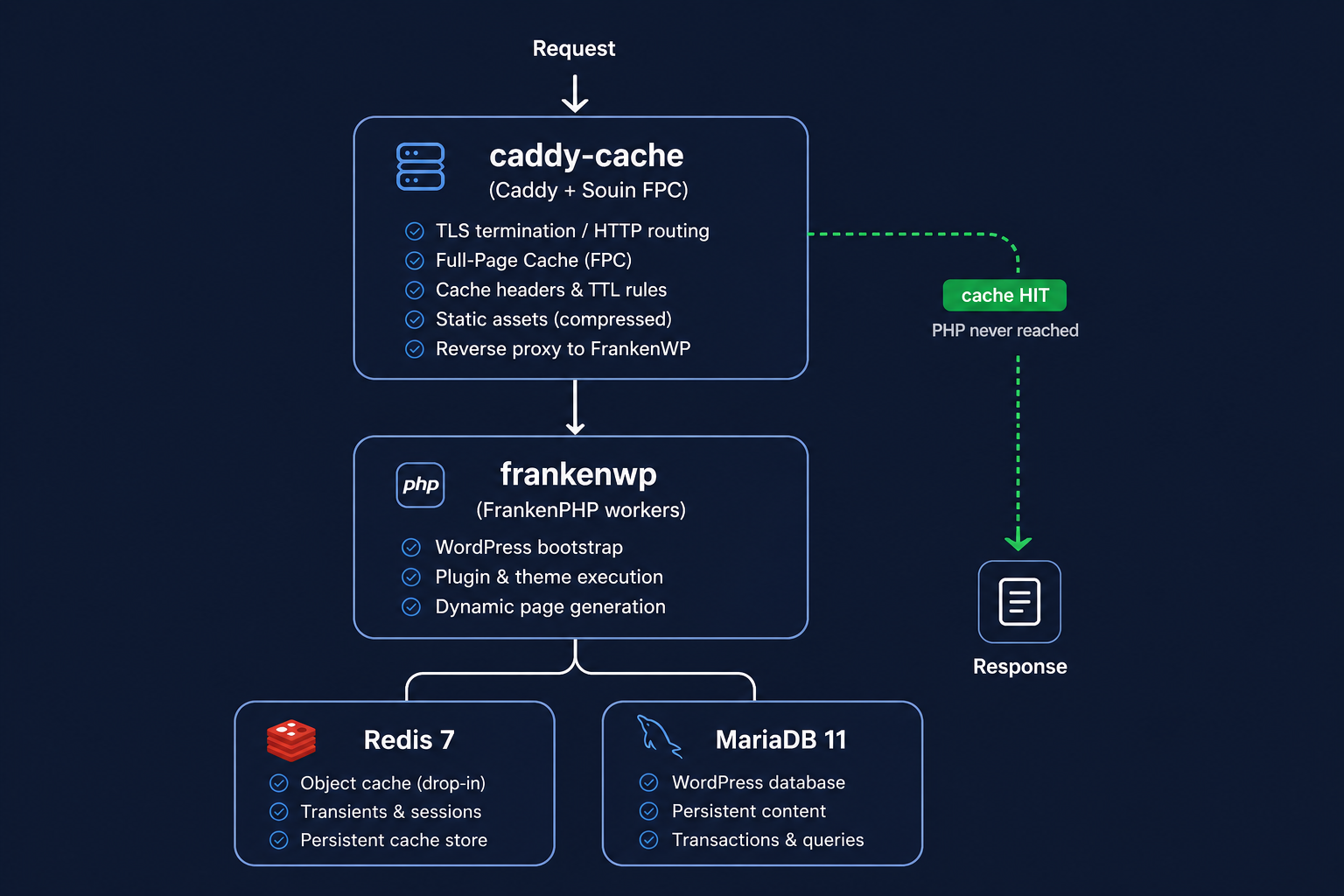
The key thing here: frankenwp has no external ports. All public traffic goes through caddy-cache. Cache hits never touch PHP. Souin serves from Redis. Sensitive WP files are blocked at the proxy layer before the request hits PHP at all.
The Cache-Status: Souin; hit; detail=REDIS header on the shop page confirms it's working end-to-end:
HTTP/2 200
cache-status: Souin; hit; detail=REDIS
via: 1.1 Caddy
The Caddyfile has one important route I added after a painful debugging session - an explicit no-cache bypass for /wp-admin*, /wp-login.php, /wp-json*, and /wp-cron.php. Without this, Souin can cache an unauthenticated 302 redirect from /wp-admin/ and replay it on authenticated requests. That one took me longer than I'd like to admit (see the login regression gotcha below).
Phase 0: Benchmarking Harness
I built the benchmarking harness before optimizing anything. You can't claim "X is faster" without a baseline. Requirements: k6, sqlite3 CLI, bash. No npm, no Python.
Schema: three tables in bench/db/bench.db:
runs- one row per k6 invocation: timestamp, base URL, scenario, profile, VU count, git SHAmetrics- catalog of k6 metrics:http_req_duration,http_req_waiting, etc.runs_metrics- pivot: run x metric → avg, min, max, p50, p95, p99
Five k6 scenarios: homepage, product, cart, checkout, add-to-cart.
Three load profiles: smoke (1 VU, 30s), sustained (10 VU, 2 min), stress (100 VU, 60s).
handleSummary writes JSON that ingest.sh inserts into SQLite. report.sh generates self-contained HTML. By commit ca3e631 I had a baseline. Every subsequent commit has a before/after comparison in the same database. 79 runs later, the progression is clear.
Phase 1: Stack Assembly
The interesting parts of Phase 1 aren't the compose file - it's the entrypoint.sh automation that bootstraps WordPress from environment variables in a way that's idempotent on every container restart.
X-Forwarded-Proto chain is the trickiest bit. Caddy passes X-Forwarded-Proto: https upstream, but WordPress's is_ssl() only returns true if $_SERVER['HTTPS'] is set. The entrypoint.sh patches wp-config.php at startup to honor the forwarded header, setting $_SERVER['HTTPS'] = 'on' when HTTP_X_FORWARDED_PROTO is https, injected before the ABSPATH check. Miss this and all asset URLs generate as http://, mixed content errors everywhere.
URL pinning: WP_HOME, WP_SITEURL, and WP_CONTENT_URL all get pinned to the HTTPS URL. Without WP_CONTENT_URL, asset URLs flip to http:// on pages where is_ssl() returns false, which is always, because FrankenPHP only sees internal HTTP. Mixed content errors on assets specifically - a different bug and harder to trace.
System cron: WP's built-in cron fires on random page loads. On a FPC stack this breaks, cache-served pages don't execute PHP. The fix: disable WP_CRON and run a background loop in entrypoint.sh that calls wp cron event run --due-now every 5 minutes.
Phase 2: The MU-Plugin
The MU-plugin has 12 modules. Each is a standalone PHP file loaded by a directory scanner in mu-plugins/ultrafastwoo.php. No classes, no autoloading, no dependencies - each file does one thing.
Cart Fragments Killer
wc-cart-fragments fires an AJAX call to /wc-ajax/?wc-ajax=get_refreshed_fragments on every page load to keep the cart count updated. This module kills it entirely. The cart count updates via Datastar signals instead - when the user adds to cart via SSE, the server emits a cart_count signal patch that rerenders the nav count. No polling, no AJAX call.
Script Dequeue
Removes emoji scripts and styles, the WordPress generator meta tag, Dashicons for logged-out users, and wp-embed. More importantly, removes five WC scripts that are dead weight on the Datastar theme: wc-cart, the legacy woocommerce global object, wc-add-to-cart (the form submit handler, replaced by SSE), and both UTM tracking scripts (wc-order-attribution, sourcebuster-js). Also removes all three WC stylesheets entirely - replaced by the theme's CSS.
There's one ordering subtlety here: wc-cart declares woocommerce as a dependency. If you deregister woocommerce first, WP 6.9.1 fires a _doing_it_wrong notice on every page load because wc-cart is still registered and pointing at a missing dep. The fix is to deregister wc-cart first, then woocommerce, and add a safety hook at wp_print_scripts with PHP_INT_MAX priority to catch anything that re-enqueues late.
Heartbeat Tamer
WordPress Heartbeat polls every 15-60s via wp-admin/admin-ajax.php. On the frontend this is pure waste. Fixed: gone on frontend, throttled to 60s on admin (autosave still works).
Disable Blocks
The most complex module. On a Datastar theme using zero Gutenberg blocks, the entire block pipeline is dead weight - wp-block-library CSS (~80 KB), global-styles inline CSS, WC BlockTypesController (registers ~80 block types at init), WC BlockPatterns.
The WC Blocks removal is the tricky part. WC registers block types via instance methods on objects inside a DI container. You can't remove_action using the class name - you have to retrieve the actual object instance from the container, then pass that to remove_action. The inline block CSS gets stripped at wp_head with a high-priority hook. This module saves around 11ms per cache-miss request - the biggest single per-request win after the FPC itself.
Page Cache Headers
The glue between WordPress and Souin. Emits Cache-Control headers that Souin respects. The logic:
- Never cache admin, REST, cron, login
no-store, privatefor logged-in usersno-store, privateif WC session cookies present (woocommerce_items_in_cartorwoocommerce_cart_hash)no-store, privatefor cart, checkout, account pagespublic, max-age=3600, s-maxage=3600, stale-while-revalidate=86400for everything else
The cookie detection is what makes this correct. A visitor who adds something to their cart gets a woocommerce_items_in_cart cookie. From that point all their requests emit no-store and Souin never serves them stale pages.
WC Frontend Optimizer
Catches WC overhead that doesn't fit elsewhere: removes rating stars loop action (saves a DB query per product in archives), removes WC structured data (replaced by custom schema.org in the theme), disables marketplace suggestions, disables persistent cart, disables order attribution, removes WC admin bar nodes on the frontend.
Also batch-primes thumbnail attachment caches on shop and category pages - prevents N×2 DB queries for product images. And pre-warms 14 WC options via wp_prime_option_caches() at muplugins_loaded@PHP_INT_MAX so every subsequent get_option() for those keys is a cache hit.
Worker Safety Auditor
Scans active plugin files for patterns dangerous in FrankenPHP worker mode: die(), exit(), session_start(), header('Location:'), $GLOBALS writes, wp_die(). A die() in worker mode kills the PHP worker process entirely. Under load, cascading latency spikes.
Runs once per day on admin_init, zero cost to the frontend. Results at Tools → Worker Safety. Reports only, doesn't deactivate anything.
Phase 3: Datastar-Native Theme
The theme runs on Datastar v1.0.0 with HyperPress 3.1.1 providing SSE infrastructure.
Why Datastar over HTMX? Datastar uses a persistent SSE connection for server-to-client communication. The server can push multiple signal patches in one response - a cart add can simultaneously update the cart count in the nav, the button state, and the mini-cart drawer. HTMX fires separate AJAX requests per action. For a WC storefront, the SSE model fits better.
HyperPress 3.1.1 ships Datastar RC.7, not v1.0.0 GA. Different event names. The theme replaces HyperPress's bundled Datastar with the v1.0.0 GA build at wp_enqueue_scripts@20.
There's also a namespace bug in HyperPress 3.1.1 - it expects the Datastar SDK at HyperPress\starfederation\datastar\ServerSentEventGenerator but the SDK is at starfederation\datastar\ServerSentEventGenerator. Fixed with a class_alias at after_setup_theme@1.
CSS is built on Stellar CSS design tokens - CSS custom properties for colors, spacing, typography. Self-hosted fonts (no Google Fonts, no GDPR exposure, no external DNS lookup). Inter latin subset + Inconsolata. The Caddy Link preload header fires for the critical weights before the browser parses HTML.
WooCommerce templates are overridden in woocommerce/. The shop archive is a Datastar-reactive grid: filters, sorting, and pagination all use SSE. Product search uses a posts_search filter for title-only LIKE matching - standard WP search also searches post content, which is too broad for products and too slow without a FULLTEXT index.
Add-to-cart: data-on:click="@post('/wp-html/v1/cart-add')". The SSE response patches cart count, button state, and mini-cart HTML. No page reload.
The Numbers
79 k6 benchmark runs across the full development timeline.
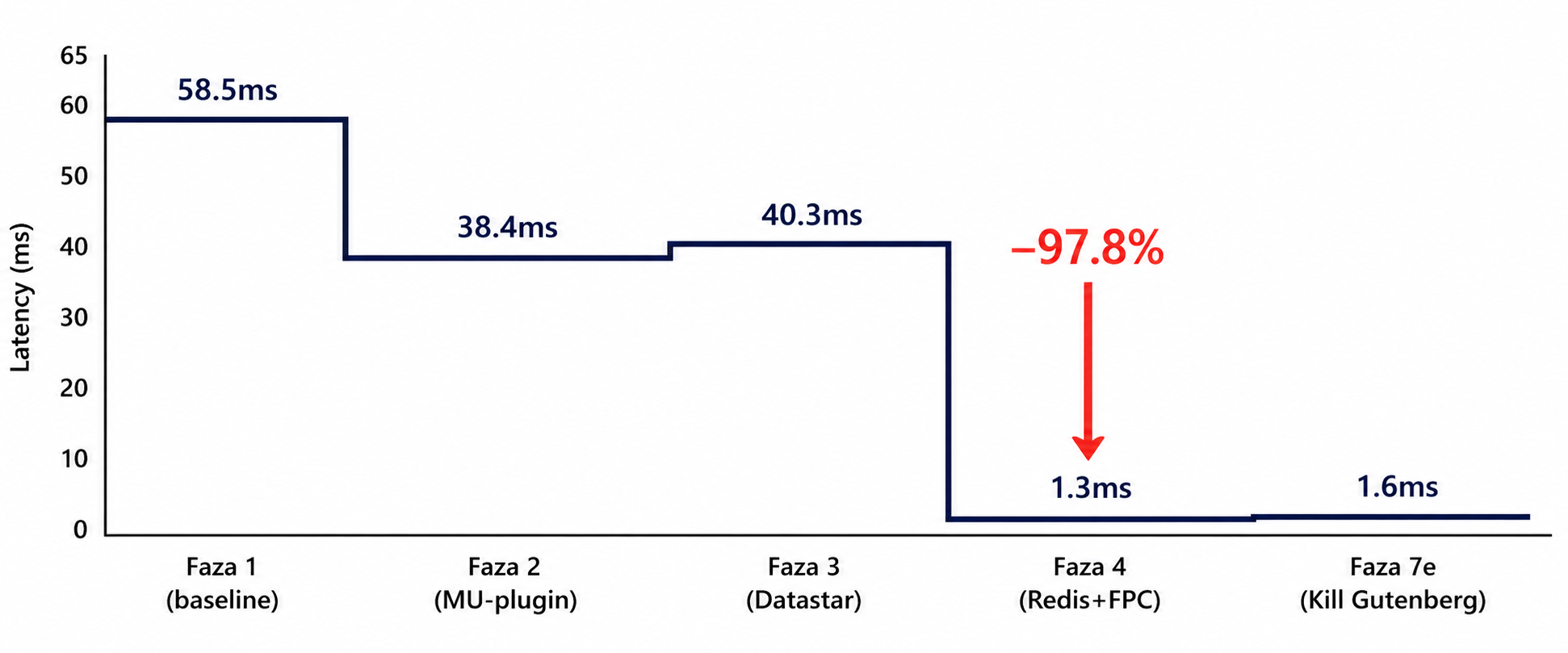
Phase Progression - Smoke (1 VU, 30s), Homepage avg
| Phase | What changed | Avg (ms) | Delta |
|---|---|---|---|
| Faza 1 - FrankenWP baseline | FrankenPHP + MariaDB, no cache | 58.5 | - |
| Faza 2 - MU-plugin | Cart fragments, scripts, heartbeat | 38.4 | -34% |
| Faza 3 - Datastar theme | Zero jQuery, SSE cart | 40.3 | -31% |
| Faza 4 - Redis + Caddy FPC | Object cache + full-page cache | 1.3 | -97.8% |
| Faza 7e - Kill Gutenberg | Blocks, global-styles, font-faces removed | 1.6 | -97.3% |
Full Scenario Comparison - Smoke (1 VU, 30s)
| Scenario | Faza 1 | Faza 4 | Faza 7e | Total delta |
|---|---|---|---|---|
| Homepage ✓ | 58.5 | 1.3 | 1.6 | -97% |
| Product ✓ | 59.0 | 1.4 | 1.7 | -97% |
| Cart | 62.0 | 38.2 | 32.1 | -48% |
| Checkout | 57.0 | 30.4 | 27.8 | -51% |
| Add-to-Cart | 44.3 | 21.5 | 23.5 | -47% |
✓ = served from Caddy in-memory cache after first request.
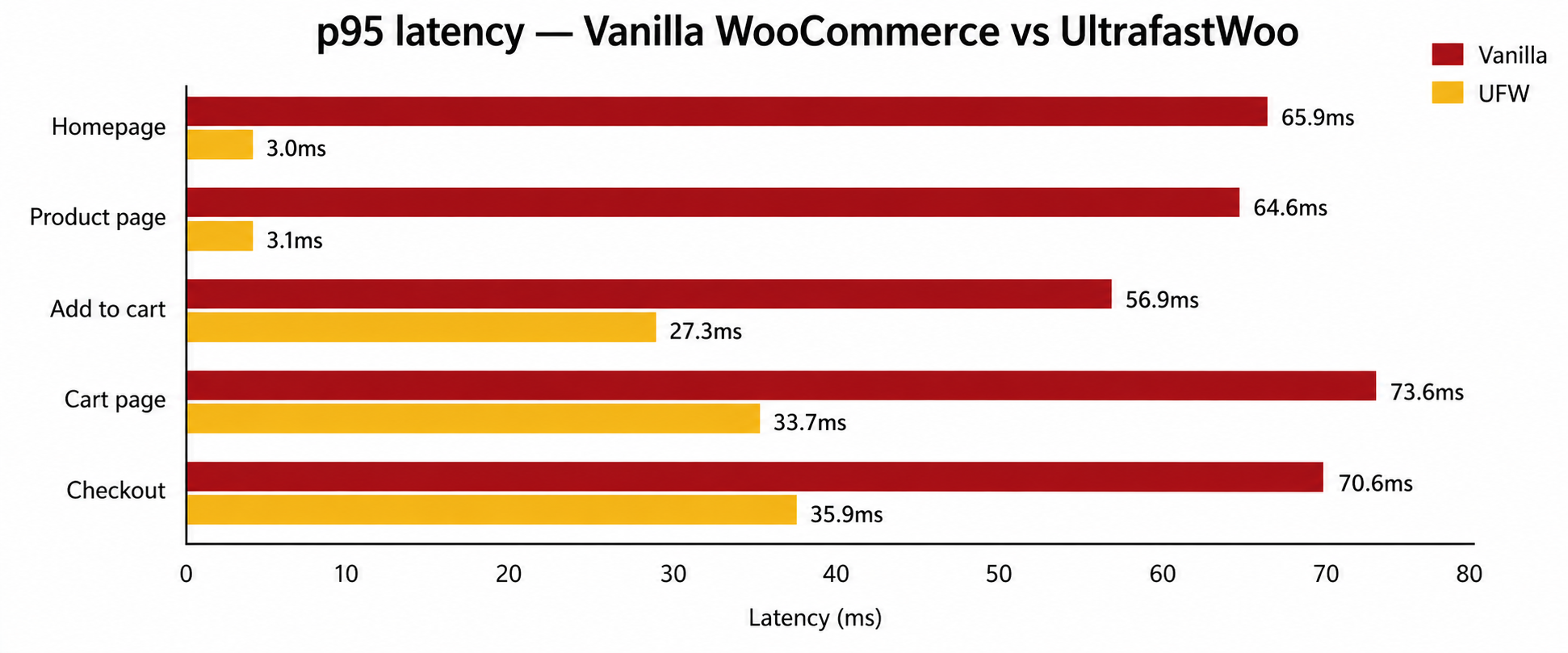
Vanilla vs Full UFW Stack - p95 latency
| Scenario | Vanilla p95 | UFW p95 | Improvement |
|---|---|---|---|
| Homepage | 65.9 ms | 3.0 ms | -95% |
| Product page | 64.6 ms | 3.1 ms | -95% |
| Add to cart (SSE) | 56.9 ms | 27.3 ms | -51% |
| Cart page | 73.6 ms | 33.7 ms | -54% |
| Checkout | 70.6 ms | 35.9 ms | -49% |
Concurrent Load - Sustained (10 VU, 2 min)
| Scenario | No FPC p95 | With FPC avg | With FPC p95 | Δ avg |
|---|---|---|---|---|
| Homepage ✓ | 116.8 ms | 5.0 ms | 9.0 ms | -94.8% |
| Cart | 115.2 ms | 36.5 ms | 43.2 ms | -60.8% |
Peak Load - Stress (100 VU, 60s)
| Scenario | avg | p95 | Cache |
|---|---|---|---|
| Homepage ✓ | 32.3 ms | 71.2 ms | HIT |
| Product ✓ | 31.7 ms | 70.7 ms | HIT |
| Checkout | 48.1 ms | 88.2 ms | MISS |
| Cart | 70.6 ms | 106.4 ms | MISS |
| Add-to-Cart | 329.7 ms | 558.7 ms | MISS |
The add-to-cart number at 100 VU looks alarming but it's a harness artifact. k6 uses a shared nonce across all virtual users and WC correctly rejects most as replays. Real users have individual sessions. In production, add-to-cart at 100 VU would look closer to checkout (40-90ms).
The headline number: homepage at ~4,350 req/s under 100 VU stress. The cache is the difference.
Gotchas & Hard-Won Lessons
These cost me time. Documenting them so you don't repeat them.
Gotcha #1
FrankenPHP worker mode requires restart for any PHP file change
Workers load PHP files at startup and keep them in memory. This isn't just a "change a template" problem - every plugin activation, deactivation, update, and theme switch requires docker compose restart frankenwp before it takes effect. WP-admin lets you click "Activate" and the plugin appears active in the DB, but the workers are still running the old code.
In production this means your deployment workflow must include a worker restart after any wp-admin action that changes loaded PHP. If you're using automated plugin updates, those updates won't fully apply until the next restart. In development: container restart is the only reliable fix. kill -USR2 1 (graceful reload) works in some FrankenPHP builds but isn't guaranteed across versions.
Gotcha #2
The two-container login regression
At one point during development, wp-admin login broke in a confusing way: login POST → redirect to wp-admin → immediate redirect back to login. Credentials were correct.
The cause: two Docker containers were both registered as VIRTUAL_HOST=ultrafastwoo.loc in nginx-proxy. The old wp-test create Apache container was still running alongside the FrankenPHP stack container. nginx-proxy round-robined between them. Login POST hit FrankenPHP, session cookie written to FrankenPHP's DB. Redirect GET /wp-admin/ hit the Apache container, no matching session, redirect back to login.
Fix: wp-test destroy ultrafastwoo.loc to remove the stale container. Before debugging authentication, check how many containers are listening on your hostname. docker ps --format "table {{.Names}}\t{{.Ports}}" takes 10 seconds and would have saved me an hour.
Gotcha #3
wp-multitool strips ?ver= from cached URLs
wp-multitool's profiler rewrites asset URLs to remove cache-buster query strings. Caused a confusing half-hour where Caddy's CSS preload headers were returning 404s. The file existed, the URL had been silently rewritten. Always verify asset URLs in the actual HTML response.
Gotcha #4
Souin cache persistence across rebuilds
Souin persists to a Docker volume. If you change the ttl in the Caddyfile and rebuild, old entries with the previous TTL remain until they expire naturally. Always docker compose down -v && docker compose up -d before a clean benchmark run.
Gotcha #5
X-Forwarded-Proto chain
The HTTPS detection is layered. Caddy passes X-Forwarded-Proto: https to FrankenPHP. WordPress's is_ssl() only returns true if $_SERVER['HTTPS'] is set. The entrypoint.sh injection sets this when HTTP_X_FORWARDED_PROTO === 'https'. Miss any layer and you get mixed content errors. Miss WP_CONTENT_URL specifically and you get mixed content on assets only - a different and harder-to-trace bug.
Gotcha #6
WC sessions require a shipping zone
The checkout SSE flow failed silently on a fresh WC install until I added a shipping zone. WC won't complete wc_checkout() without at least one shipping method for the customer's location. The error message in the SSE response was a generic WC error that didn't mention shipping at all. Add a shipping zone for Everywhere in dev setup.
Gotcha #7
HyperPress rewrite rules flush requirement
HyperPress registers /wp-html/v1/* routes via add_rewrite_rule() at plugin load. WordPress doesn't recognize these until flush_rewrite_rules() runs. If you add HyperPress to a running install without flushing, all SSE endpoints return 404. Always run wp rewrite flush after activating HyperPress.
Gotcha #8
Datastar v1.0.0: data-headers doesn't exist
HyperPress docs show data-headers for passing custom HTTP headers. This attribute doesn't exist in Datastar v1.0.0. Headers go in the options object passed as the second argument to @post, not in a data-headers attribute. Datastar swallows data-headers silently - no console output, requests return 403, Add to Cart appears to do nothing.
Gotcha #9
Datastar signals via hp_ds_read_signals()
Cart mutations need the Datastar signal payload from the request body. HyperPress 3.1.1 provides hp_ds_read_signals() for this. $_POST doesn't work - Datastar sends the signal store as JSON in the request body, not form-encoded. Always use hp_ds_read_signals() on SSE handler endpoints.
Gotcha #10
WP 6.9.1 strict script dependency check
WP 6.9.1 added a _doing_it_wrong notice when a deregistered script is still declared as a dependency by another registered script. The MU-plugin deregisters woocommerce (the legacy global WC JS object). WC's wc-cart script declares woocommerce as a dependency, triggering the notice on every frontend page load. Fix: deregister wc-cart before woocommerce, and hook the dequeue at both wp_enqueue_scripts and wp_print_scripts at PHP_INT_MAX.
Gotcha #11
Redis Object Cache plugin deadlocks FrankenPHP workers
At one point I activated the standard redis-cache plugin (WordPress Redis Object Cache). It installed an object-cache.php drop-in and appeared to work. Then I restarted the container and all 22 FrankenPHP workers hung. No PHP fatal, no error in the logs - every request returned "Internal server error" and timed out.
The cause: object-cache.php holds a persistent Redis connection in a way that doesn't survive FrankenPHP worker mode's shared-state lifecycle. Workers deadlock waiting for a Redis response that never comes. Fix: deactivate the plugin, delete wp-content/object-cache.php, restart the container.
redis-cache is incompatible with worker mode. Don't install it. If you need it, look at Relay - a FrankenPHP-aware persistent Redis client.
Gotcha #12
WooCommerce ReserveStock N+1 (acknowledged, not fixed)
At 55 queries per cart page load, one pattern worth noting: ReserveStock::get_reserved_stock() fires one SQL query per cart item. There's no batch API in the current WC codebase. For 4 cart items that's 4 queries at ~0.0001s each - negligible. But it's an N+1, and 40 items in a cart would be 40 queries. This would need to be fixed upstream in WC. For now: noted, not fixed.
Current baseline: 55 queries in 0.16s on the cart page, logged-in user (Query Monitor, FrankenPHP worker mode, no object cache drop-in).
What's Next
PHP 8.5 in FrankenWP - upstream doesn't have a latest-php8.5 tag yet (April 2026). When it appears, updating the FROM line is the only change needed. Plan: check monthly, build from dunglas/frankenphp:1.12.2-builder-php8.5 directly if upstream is still behind by July 2026.
Cart/checkout performance - at 100 VU, cart averages 70ms and checkout 48ms. Both acceptable, but there's room. The next step is profiling WC session handling and whether wc_session_* options can move to Redis. The architecture already allocates Redis DB 1 for sessions, the wiring isn't complete.
Disable Blocks as a standalone plugin - the disable-blocks.php module is useful outside UltrafastWoo. Any WP site on a classic theme would benefit. It's 90 lines, zero dependencies, worker-safe. Worth a WordPress.org submission.
Worker Safety Auditor as a standalone plugin - broadly useful for anyone evaluating FrankenPHP compatibility. The scan patterns could be expanded: $_SESSION, ob_start without paired ob_end, etc.
Mikrus one-click installer - install.sh is functional but not yet tested on a live Mikrus instance. Needs live validation: RAM detection, Docker fallback, secrets generation. Mikrus is a Polish budget VPS provider - plans start at 384 MB RAM for 35 PLN/year (there's even a free 256 MB FROG tier). It's what I use for most of my projects. If you want to try UltrafastWoo on the cheapest possible hardware, that's the place.
CI benchmarks - the harness supports it, the GitHub Actions step is documented, the implementation isn't wired yet.
Does it run on 256MB?
Short answer: stripped version, yes. Full stack, no.
The full stack needs 512MB minimum. On 256MB you can run FrankenPHP with 2 workers, MariaDB tightly tuned (innodb_buffer_pool=32M), Redis for sessions - but Souin full-page cache has to go.
That trade-off matters. Souin is responsible for the 94% headline number. Without it, you keep the DB query reductions, worker-mode benefits, WC session optimization - real improvements, but the "bypass PHP entirely" tier is gone.
| VPS RAM | Config | Expected win |
|---|---|---|
| 256MB | FrankenPHP + plugin, no Souin | ~40-60% faster than vanilla |
| 512MB | Full stack | 94% on cached pages, full numbers |
| 1GB | Full stack + headroom | Comfortable production |
Conclusion
A WooCommerce store can serve browse traffic at 3ms p95 on a budget VPS with no CDN, no managed hosting, no autoscaling. Full-page cache is as old as Varnish. The combination of FrankenPHP worker mode (no cold start), Caddy Souin (correct cache invalidation via Cache-Control: no-store), and Datastar (no jQuery, no polling) creates a stack that holds up under load.
The 97% latency reduction on browse pages is real. The 47-54% reduction on dynamic pages (cart, checkout) is also real, driven by FrankenPHP worker persistence and a purpose-built WC session layer.
The codebase is a monorepo: bench/, stack/, plugin/, theme/. The benchmarking harness - k6 scenarios, SQLite schema, report generator - is in the repo. No npm, no Python. The repo is private for now - I've put a lot of time into this and I'm thinking about turning it into a product. If that happens, I'll write about it here.
WordPress performance is my thing
I've been digging into WooCommerce internals for years - slow queries, bloated autoload, cache misses, PHP cold starts. If your store is slow and you're not sure why, I can help. Hands-on audit, real fixes, not a report.